Visitor movement and search analytics
Every search and every route says something about the site. The AddNavi panel collects this data and shows site managers what visitors look for and which way they walk.
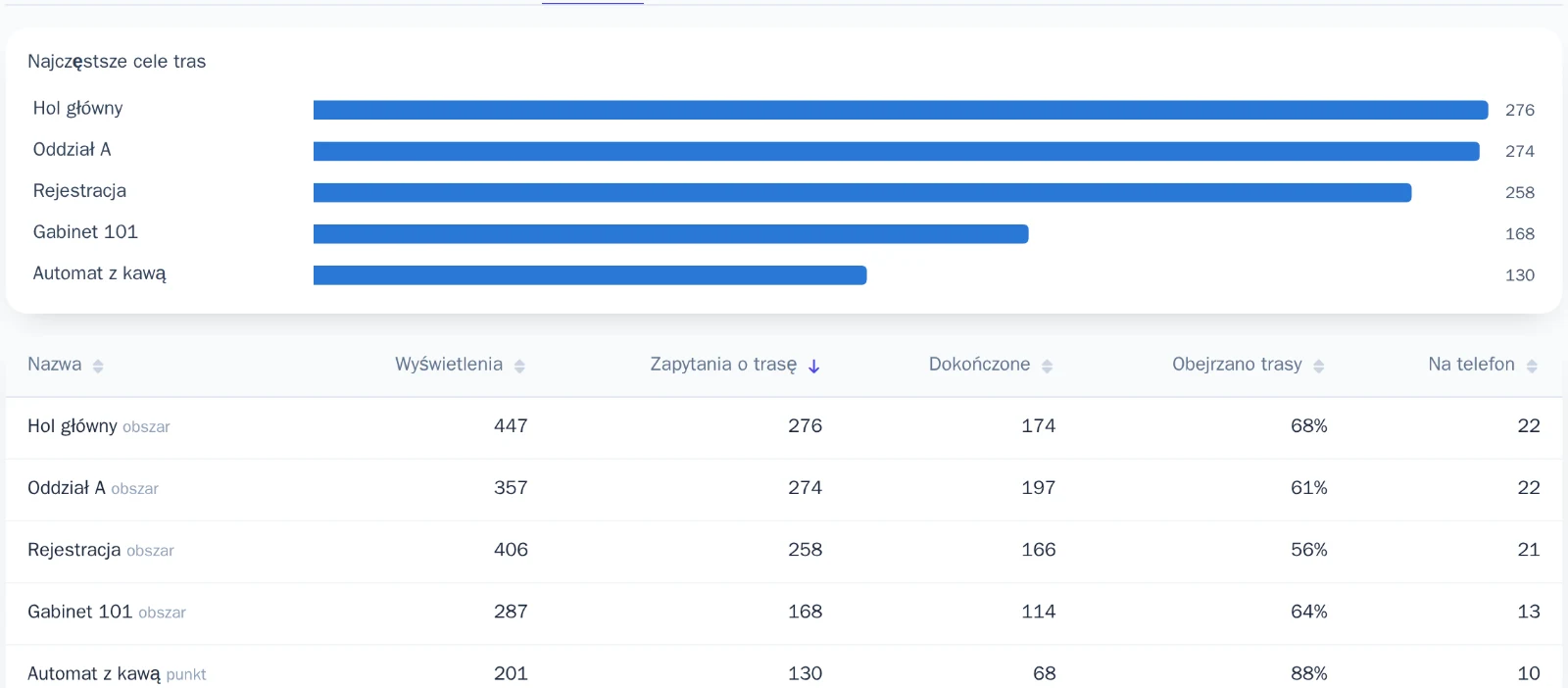
What visitors look for
Top searches and destinations show which places matter most to visitors. A hospital sees which clinics patients go to most often, and a shopping centre sees which shops customers look for.

Which way they walk
Routes, entry points and a movement heat map show how visitors move through the site and where they start looking for their way. Site managers use this to decide where to put more kiosks, what to change in the signage and where to move services.
- Top searches and destinations
- Routes and entry points
- Movement heat map
- Data export to the organisation’s tools
Frequently asked questions
Who can see the analytics?
The organisation’s administrators, in the panel and according to their roles. They sign in with their company account.
Can the data be exported?
Yes. Analytics data can be exported and analysed in the organisation’s own tools.
Do the analytics cover both kiosks and phones?
Yes. The panel shows searches and routes from the kiosks and from visitors’ phones.
AddNavi by industry
Talk to an expert
An AddNavi expert will discuss the specifics of the site and tailor the scope of the deployment.
- E-mailhello@addnavi.com
- Phone+48 51 500 60 70
- AddressAddictive Group Sp. z o.o.
al. Józefa Piłsudskiego 92, 92-202 Łódź, Poland